Showing posts with label abcpdf. Show all posts

Thursday, 30 May 2019

How PDF Links works the same way of WebSite Links using ABCPDF Library?

Hi Readers,

Scenario: Read any web site/Page using AddImageUrl function in Abcpdf library but Page/Site has links. How in website links perform the same way in PDF also should work.

Solution: The below code performs the same.

Key Points:

1. If we are not using the below two lines then PDF Links are like normal Text.
  doc.HtmlOptions.AddLinks = true;
  doc.HtmlOptions.LinkPages();

2. An important point to remember is order and the place where to add,

   Either add before the following line like below,
   doc.HtmlOptions.AddLinks = true;
   doc.HtmlOptions.LinkPages();
   int theID = doc.AddImageUrl("https://techinuthan.blogspot.com/"); 
   
     Or the other option is the below sample code,

Sample Code:


using System;
using System.IO;
using WebSupergoo.ABCpdf11; namespace Demos_on_abcpdf {     class Program     {         static void Main(string[] args)         {             string theBasePath = Directory.GetParent(Directory.GetCurrentDirectory()).Parent.FullName;
            string outputFolder = theBasePath + @"\Output\";

            // This Doc class is coming from WebSupergoo.ABCpdf11 namespace.
            Doc doc = new Doc(); 
  
            #region Demo 1 Starts -  Multiple Pages inside single PDF With Links action Perform
            doc.HtmlOptions.AddLinks = true;
            // Converts web page to multiple Images in PDF
            int theID = doc.AddImageUrl("https://techinuthan.blogspot.com/"); 
            while (true)
            {
                if (!doc.Chainable(theID))
                    break;
                doc.Page = doc.AddPage();
                doc.AddImageToChain(theID);
            }
 
            doc.HtmlOptions.LinkPages();
            doc.Save(outputFolder + "ConvertWebPageToMultiplePagesWithLinks.pdf");
            #endregion Demo 1 Ends - Multiple Pages inside single PDF With Links action Perform
 
 
            Console.WriteLine("PDF Generated Successfully");
            Console.ReadLine();
        }
    }
}

Output: 
Check output for this code from this GitHub URL : Multiple WebPages In Single PDF With Link Actions

Happy Coding:)

Wednesday, 29 May 2019

[Solved] - Your Trail License has expired. Your can Purchase full license from the Abcpdf website

Hi Readers,

If you are facing abcpdf license expiry issue then follow the below steps and fix the problem.

Note: This fix is only for people who already purchased full license of ABCPDF.NET 

Step 1: First Install ABCPDF.NET executable file from ABCPDF website.
             Either 32-Bit or 64-Bit version

Step 2: Once the installation success, Go to the following folder,
              For 64-Bit: C:\Program Files\WebSupergoo\ABCpdf .NET 11.3 x64\

Step 3: Double click on the below EXE (File Name: PDFSettings)
             
Click on the highlighted EXE 

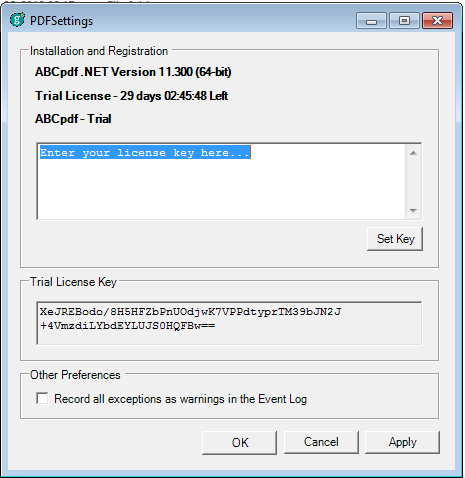
Step 4: It will open the following popup which shows Installation and Registration Information
             If still Trail license is not complete then shows remaining days with a current running time
             or Trail Version is expired


Step 5: Take your purchased key and replace the "Enter your license key here.." with your actual key.

Step 6: Click on Set Key and opens a popup stating that to reflect the key close it.

Step 7: Click on Apply and Ok

Step 8: To cross check whether a key is applied, Double click on EXE and check whether it is showing Professional License instead Trail License Expired and key in the window.

Hope this article solves your problem...
Happy Coding :)


How to generate a pdf with multiple pages using AddImageUrl function in abcpdf library?

Hi Readers,

In this article, using abcpdf AddImageUrl function, generates a pdf with multiple pages.

If Url has multiple pages then PDF has multiple or else only single page PDF will create.

Sample Code:

using System;
using System.IO;
using WebSupergoo.ABCpdf11; namespace Demos_on_abcpdf {     class Program     {         static void Main(string[] args)         {
            string theBasePath = Directory.GetParent(Directory.GetCurrentDirectory()).Parent.FullName;
            string outputFolder = theBasePath + @"\Output\";
           // This Doc class is coming from WebSupergoo.ABCpdf11 namespace.
            Doc doc = new Doc(); 
 
            #region Demo 1 Starts -  Multiple Pages inside single PDF
            // Converts web page to multiple Images in PDF
            int theID = doc.AddImageUrl("https://techinuthan.blogspot.com/"); 
            while(true)
            {
                if (!doc.Chainable(theID))
                    break;
                doc.Page = doc.AddPage();
                doc.AddImageToChain(theID);
            }
            doc.Save(outputFolder + "ConvertWebPageToMultiplePages.pdf");
            #endregion Demo 1 Ends - Multiple Pages inside single PDF
 
            Console.WriteLine("PDF Generated Successfully");
            Console.ReadLine();
        }
    }
}

Note: Chainable checks whether any page is associated with the currentID in document. 
If Yes then create a new page or else break it and comeout from the code.


Output:
Check output for this code from this GitHub URL : Multiple WebPages In Single PDF


Happy Coding:)

How to add a reference of abcpdf library in a project using Visual Studio 2017 IDE?

Hi Readers,

In this article, We will get to know how to add a reference of abcpdf library in a project using visual studio 2017 IDE.

Step 1. First, create a new project as for this example I am creating a C# Console Application

Step 2: Right click on Reference folder, Browse the library from installed location, Select it

Step 3: Click on OK and it adds into Reference folder.

Step 4: In Code, add the following references

using WebSupergoo.ABCpdf11;
using WebSupergoo.ABCpdf11.Objects;
using WebSupergoo.ABCpdf11.Atoms;
using WebSupergoo.ABCpdf11.Operations;

As in the above namespaces, Objects namespace is mostly used one to manipulate the PDF

Sample Code:
using System.IO;
using WebSupergoo.ABCpdf11;
 
namespace Demos_on_abcpdf
{
    class Program
    {
        static void Main(string[] args)
        {
            string theBasePath = Directory.GetParent(Directory.GetCurrentDirectory()).Parent.FullName;
            string outputFolder = theBasePath + @"\Output\";
            // Create a basic PDF             Doc mainDoc = new Doc(); // This Doc class is coming from WebSupergoo.ABCpdf11 namespace.             mainDoc.AddText("Hello!!! My First PDF Demo using abcpdf library");             mainDoc.Save(outputFolder + "PDFWithSimpleText.pdf");         }     } }


Output:

All these sample codes are available in this Github repository: https://github.com/nuthanm/abcpdf-demos

Happy Coding:)

Introduction to abcpdf library in .NET

Hi Readers,

As we know there are many ways to generate a PDFs using different libraries like iTextSharp, Aspose and many more.

In this article, I am going to give you a piece of important information regarding abcpdf library from websupergoo product.

This library is essential for reading, writing, conversion and manipulation of Adobe PDF Documents dynamically using .NET technologies and programming languages like C#, VB, ASP.NET and more.

"One good thing is providing full support and access to the library for 30 days trail version."
Pros:
1. Supports three sets of browser engines to convert into PDF using chrome, Mozilla and IE.
2. With fewer lines, we can generate a PDF document and easy to use.
3. Abcpdf library supports HTML, CSS, Javascript, SVG Code to manipulate
4. Fully Multi-threaded and ideal to use under IIS.
5. Convert HTML Web Page to PDF either in single/ multiple pages.
6. Allowing digital signature
7. Add a form and able to provide placeholders to enter the details.
8. Supports VB/Classic ASP/C#/Web Forms in .NET
9. Native 64 Bit support for .NET
10. Require .NET 2.0 or later for Abcpdf 7 and 8.
11. Require .NET 4.0 or later for Abcpdf 9, 10 and 11.
12. Even through Nuget Package for .net core and standard.

OS (Operating Systems):
Operating SystemAbcpdf 7Abcpdf 8Abcpdf 9Abcpdf 10Abcpdf 11
Windows Xp/2003 Yes Yes Yes Yes Yes
Windows Vista/2008YesYesYesYesYes
Windows 7/2008 R2YesYesYesYesYes
Windows 8/2012 R2YesYesYes
Windows 10YesYes
Windows Server 2016YesYes
Windows Server 2019Yes

For further detailed comparisons between different releases of abcpdf versions click on this link:
Compare between different versions

Sample PDF Generation in C# using abcpdf library:
Doc mainDoc = new Doc();
mainDoc.Read(@"c:/Temp/readPDFFile.pdf);
mainDoc.AddText("Adding a new test");
mainDoc.Save(@"c:/Temp/Output/WriteIntoNewFile.pdf");


To download a trial version click on this link: Download abcpdf library